Guide · How to · 4 min read
How to keep one shared record of every customer relationship
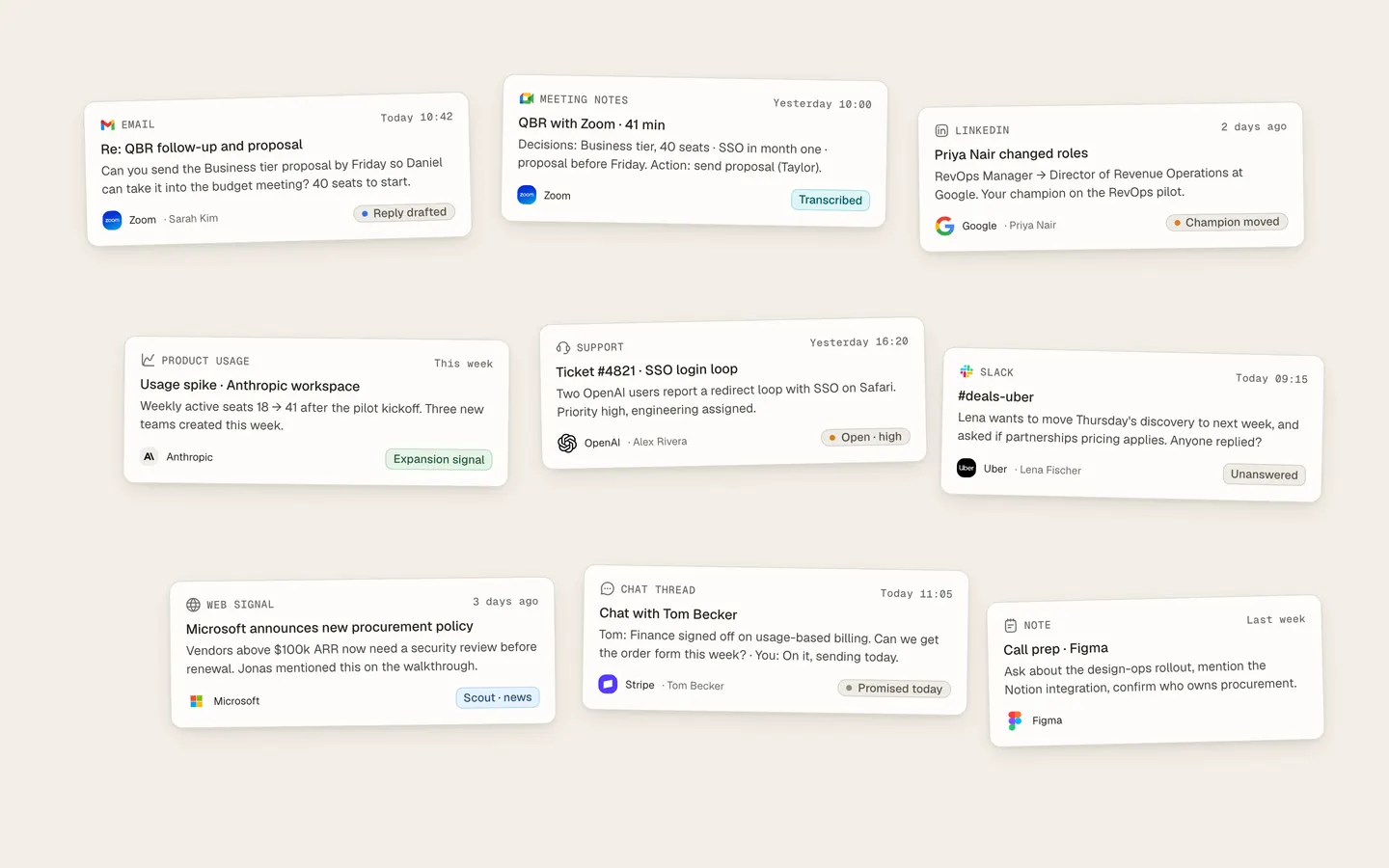
As a team grows, deal history spreads across reps’ inboxes, call recordings, LinkedIn messages, Slack threads and people’s heads. This guide covers the five ways teams fix it, what each one costs, and how to tell whether you have actually fixed it.

Soham SarkarCofounder and CEOUpdated
The short answer
To get one shared record of every customer relationship, the record has to build itself from the places conversations happen: email, calls, LinkedIn and chat. If it depends on people typing, it falls behind the moment the team gets busy.
On this page
Key takeaways
- A shared record is only useful if it is complete, current, sourced and read by everyone, people and AI alike.
- Logging discipline works on small teams with a strong manager, then breaks as the team gets busy.
- AI CRMs fix the stale record. The work the record points to, such as follow-ups and proposals, still depends on people.
- Four five-minute checks tell you whether you have one record or several.
What “one shared record” has to mean
A shared record only helps if it passes four tests:
- 1CompleteEvery email, meeting, LinkedIn message and chat thread with the customer is in it, not only what someone chose to log.
- 2CurrentIt changes within minutes of a new email or call, not at the end of the week.
- 3SourcedEvery fact links to the email, call or note it came from, so anyone can check it in one click.
- 4SharedThe whole team, and any AI the team uses, reads the same record. If the AI’s answer differs from the CRM’s, you have two records.
Five ways teams do it
| Approach | Complete | Current | Sourced | Shared | Effort |
|---|---|---|---|---|---|
| CRM plus discipline | Partly | Weekly at best | Rarely | Yes | High, every day |
| CRM plus email sync and a notetaker | Email and calls only | For logged items | Partly | Yes | Medium |
| Coding agent with connectors | Re-read on each run | When it runs | Yes | One person’s | Setup and upkeep |
| AI CRM | Email, calendar, calls, some chat | Yes | Yes | Yes | Low |
| AI operating system for revenue | Email, calls, LinkedIn, signals | Yes | Yes | Team and workers | Low |
1. A CRM plus discipline
Make logging part of the job: required fields, a weekly pipeline review, a rule that every call gets notes. It works on small teams with a strong manager.
It breaks down because the person who knows the fact is not the person with time to type it. Records fall behind whenever the team gets busy, and the narrative never makes it in: what was promised, who influences whom, what the customer worries about.
2. A CRM plus email sync and a notetaker
Sync Gmail or Outlook to HubSpot or Pipedrive, and add a meeting notetaker that pushes summaries to the record. This fixes most of the email and call gap cheaply.
It still misses LinkedIn and chat. Summaries land as notes rather than updated fields, and someone has to read across them to understand the account.
3. A coding agent with connectors
Connect Claude Code or ChatGPT to the CRM, email, meeting notes and Slack, and ask it about any account. It is very good at pulling a picture together on demand.
But it rebuilds the account from scratch on every run by re-reading each tool, so there is no record it keeps. It is also one person’s setup, and the rest of the team cannot see what it found.
4. An AI CRM
Day AI, Lightfield and Attio build the record from email, calendar and calls, and attach sources to facts. Day AI calls its version Customer Memory; Attio calls its context layer Universal Context. This is the most direct fix for a stale record.
The record is shared, but most of the work around it still depends on people: the follow-ups, prep and proposals the history should lead to.
5. An AI operating system for revenue
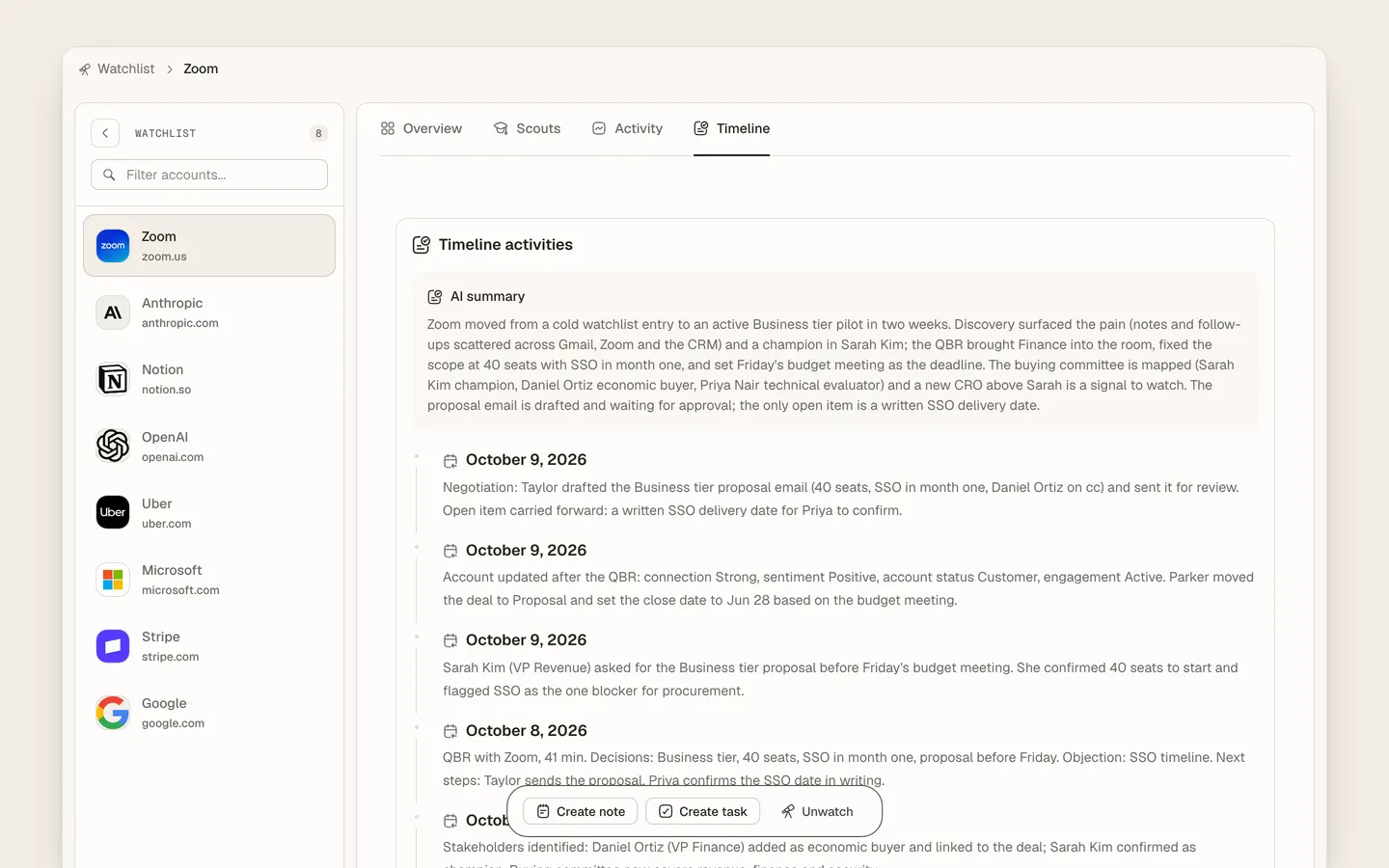
Heliyos keeps one self-updating memory per account, built from email, calls and LinkedIn, plus signals such as a funding round or a new executive, and your playbooks and files. Each account has one timeline from the first touch through every deal after it.
The same memory is what Heliyos’s AI workers read before every task and update after it. When a deal goes quiet, a worker picks it up with the whole history. When a rep inherits an account, what was promised on the last call is already there. The team approves what goes out. Teams use Heliyos as their CRM, or keep HubSpot in sync both ways.
What goes wrong without one record
Teams that skip this step see the same three failures, and they get worse once AI is involved:
The root is the same each time: someone read something other than what the team knows. One sourced, shared record fixes it, and it makes mistakes fixable too. When a follow-up is wrong, you can see which fact misled it and correct the fact.
How to tell whether you have fixed it
Four checks, five minutes each, on a real account:
- 1Source testPick any fact and find where it came from. One click, or it is not sourced.
- 2Freshness testSend yourself an email that changes a fact, such as a new close date. How long until the record shows it, and who made the change?
- 3Handoff testGive an account to someone who has never touched it. Can they explain its history in two minutes without asking anyone?
- 4Same-answer testAsk the CRM, the AI assistant and the account owner the same question. If the answers differ, you have more than one record.
When the record is the easy part
Once the record is shared and current, the next bottleneck shows up: the work it points to. The follow-up after the demo, the prep before the next call, the proposal from what was agreed. If that still depends on someone remembering, a better record only shows you more clearly what is slipping. That is the gap an AI operating system for revenue closes.
Our take
If your team is small and disciplined, a CRM with email sync and a notetaker gets you most of the way. If the record keeps falling behind, an AI CRM fixes it. If the follow-ups, prep and proposals the record points to are what slip, use a system that keeps the record and does that work in the same place. That is what we build at Heliyos.
FAQ
Questions people ask
- How do we get one shared record when deal history is spread across inboxes, calls, LinkedIn and Slack?
- Connect those sources to a system that builds the record itself, with a source on every fact. AI CRMs such as Day AI and Lightfield cover email, calendar and calls. Heliyos adds LinkedIn and market signals, and does the follow-up work from the same record.
- Can we do this in HubSpot?
- Partly. Email sync and a notetaker cover email and calls. LinkedIn, chat and the narrative usually stay outside. Heliyos syncs with HubSpot both ways if you want to keep it.
- What is customer memory?
- A record of an account built from real conversations, with sources, that people and AI read before they act. Day AI uses the term for its product; others call it a context layer or context graph.
- How is this different from a data warehouse?
- A warehouse collects events across many accounts for analysis. A shared customer record is about one account, right now, ready to act on. Nobody reads a warehouse before sending a follow-up.
Keep reading
Workers · Unified memory
One self-updating memory of every customer relationshipReadGuide
What is an AI-native CRM, and how is it different from a CRM with AI added?ReadGuide
The best AI-native CRMs in 2026, by stage and team sizeReadMy work · Meetings
Meetings: recorded, transcribed, turned into workRead
Every deal remembered. Every next step done.
Unlimited seats, priced on the work performed. Join the waitlist and we review your request.