Engage · Unified Inbox
Inbox: every conversation, with the account beside it
Gmail, Outlook and LinkedIn in one inbox. Each thread sits on the company and person it belongs to, Parker keeps the record current from it, and Taylor drafts the reply for you to approve.
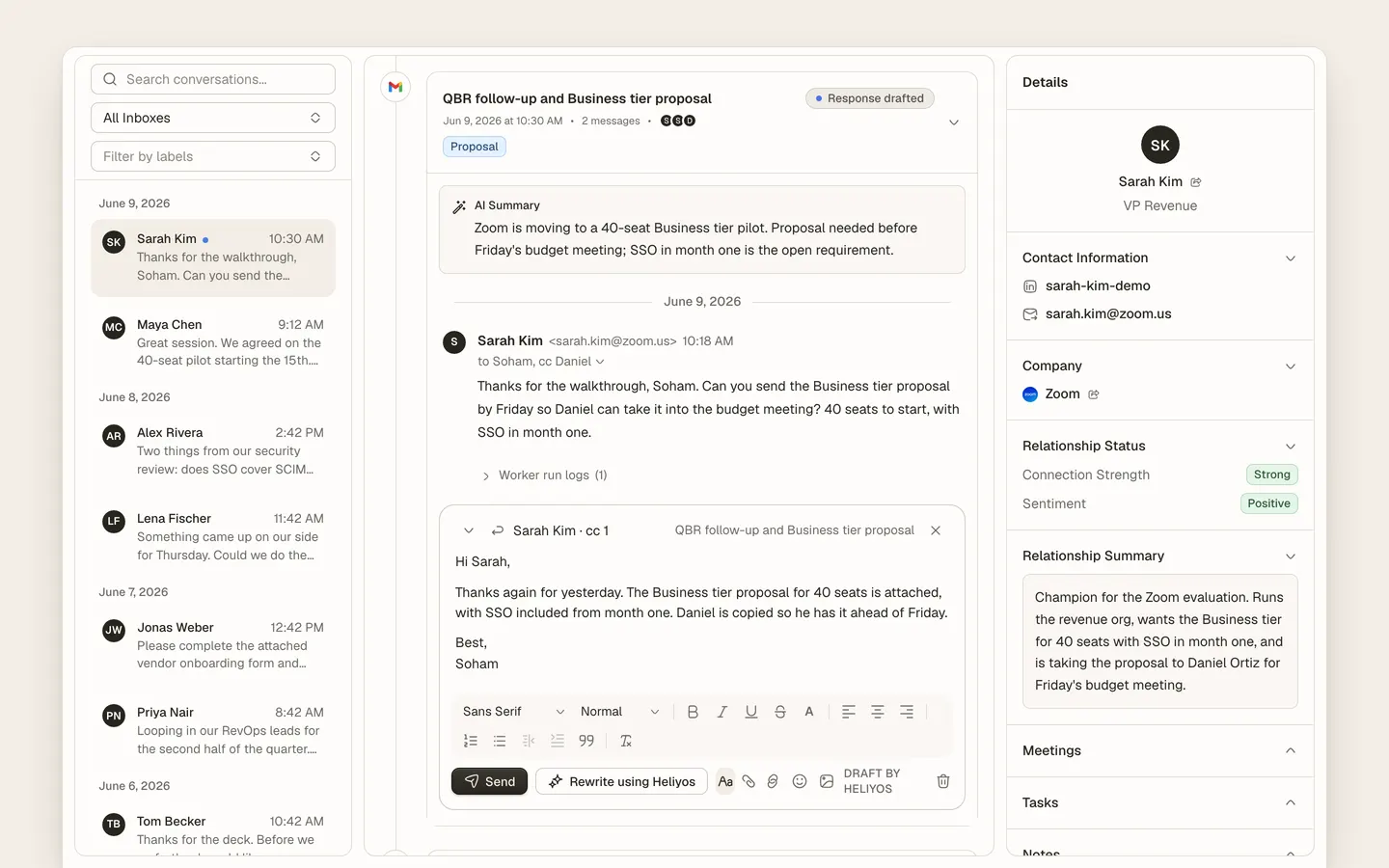
The Unified Inbox is the shared sales inbox in Heliyos. Connect Gmail or Outlook and LinkedIn and every customer conversation is threaded, matched to the company and person in the account memory and shown next to that account’s summary, meetings and open tasks. When a message arrives, Parker reads it and updates the record; when a reply is needed, Taylor drafts it from the full history and it waits in Reviews. Founders see every inbox on the team; reps filter to their own.
Use cases
Use cases
A prospect replies at 11pm
Parker reads the thread, updates the deal and creates one task. By morning Taylor’s reply is drafted and waiting for your approval, with the proposal attached.
An email from a domain you have never seen
The company and person are created, enriched and linked to the thread. No manual CRM entry, no orphan conversation.
The founder wants to see every customer thread
The All inboxes view shows the team’s customer conversations in one list, with the account and the last worker action beside each.
A rep is on leave for a week
Their threads keep moving: Parker updates records from new mail, Taylor drafts replies, and the owner approves from their phone.
You need the whole story before a call
Open the account: emails, LinkedIn messages, meeting notes, Scout signals and worker updates in one timeline, in order.
Three channels, one thread
A LinkedIn message and the email that followed are the same conversation on the same person, not two inboxes to check.
How it works
How it works
- 01
Connect Gmail or Outlook, and LinkedIn
History backfills so the account memory starts full. Nothing is sent or changed in your mailbox.
- 02
Threads land on accounts
Sender, domain and entity matching tie each conversation to a company and person, or create them.
- 03
Parker keeps the record current
Summary, fields, deal stage and a task update from the thread, each with the message it came from.
- 04
Taylor drafts, you send
Replies and follow-ups are drafted in your voice and wait in Reviews until you hand off more.
Workers
Who works here
Workers show up where the team already is, with a clear marker for who did what. Your own custom workers join them.
 Parker
 Taylor
FAQ
Questions people ask
- What is an AI sales inbox?
- A shared inbox where customer conversations are linked to the account records and AI workers read, summarise and draft replies, with a person approving before anything is sent.
- Does Heliyos send emails on its own?
- Not until you say so. Outbound email from Taylor waits in Reviews by default. You can hand off routine replies later, per account or per kind of email.
- Which email providers and channels are supported?
- Gmail and Google Workspace, Outlook and Microsoft 365, and LinkedIn messaging.
- Can the whole team share one inbox view?
- Yes. All inboxes shows every connected teammate’s customer conversations; each person can filter to their own.
Deploy your first AI worker, today.
Closed beta, usage-based pricing, no seats. Join the waitlist and we review your request.