Discover · AI Research
AI Research: a column that researches every row
Ask a question of every company or person in a table, in plain words. Heliyos researches each record, returns a structured answer with a confidence and the sources, and refreshes it so the column never goes stale.
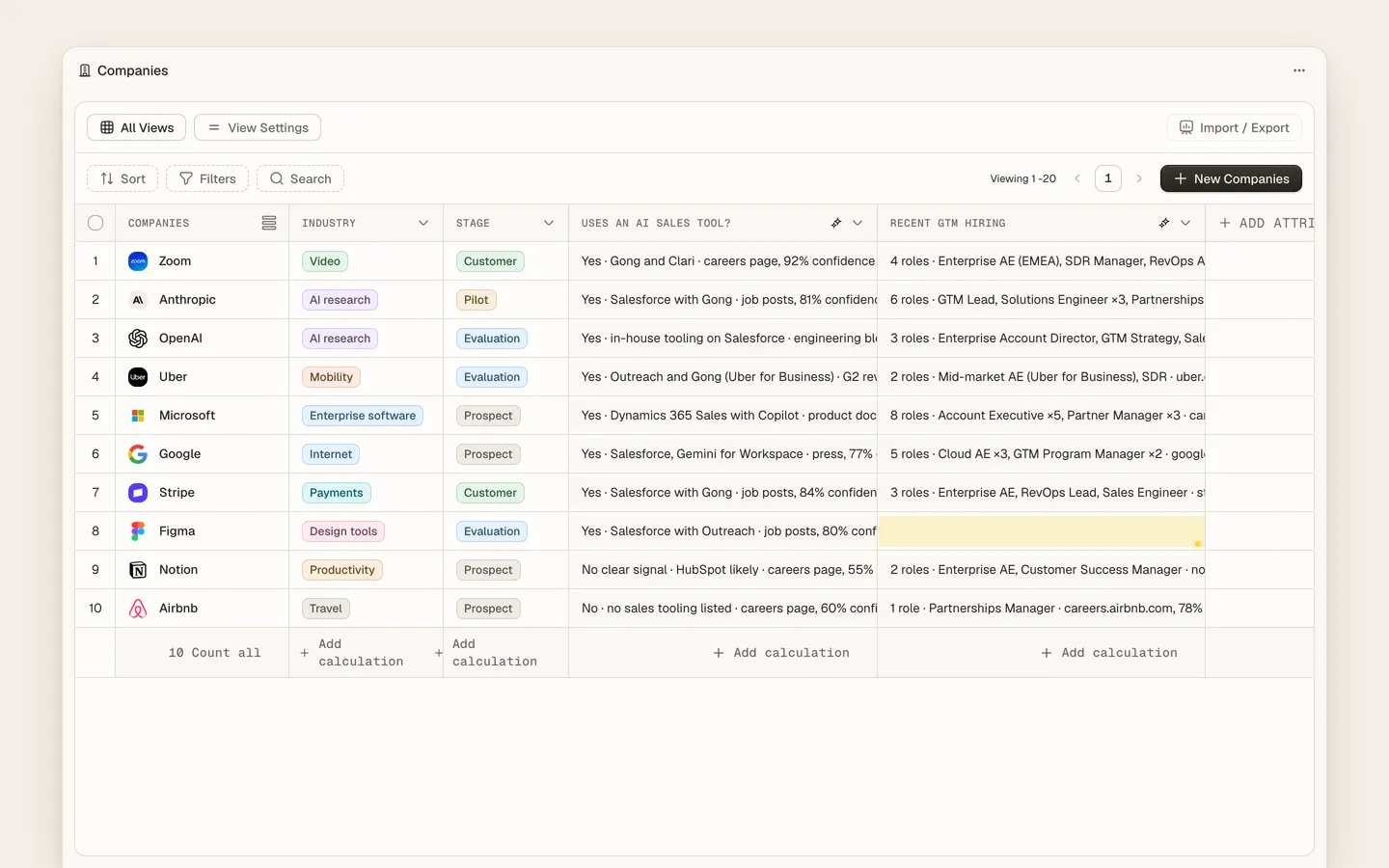
AI Research columns let a revenue team add a research question to any company or people table and get an answer for every row. Questions like "Do they sell to enterprise?", "Which CRM do they use?" or "Who leads revenue?" are answered from public sources with a confidence score and citations, written into the customer memory where workers and people use them. Columns refresh on a schedule or on demand. The answer type can be text, number, yes or no, or a pick list, so the column can drive segments and Scouts.
Use cases
Use cases
"Which of these 400 accounts use Salesforce?"
Add a yes-or-no research column. Each row is answered from the public web with the page it came from. Filter the table to the yeses and start a Scout on them.
Qualify a list before anyone calls
Columns for headcount, funding stage and target market fill in automatically. The reps work the rows that pass, not the whole list.
"Who runs revenue there?"
A people column finds the name and title with a source. Enrichment then adds the verified email.
The answer was true in March
Columns refresh on a schedule or when a signal lands, so the stack they use and the person who leads sales stay current.
A worker needs the fact mid-run
Researched answers are memory. Taylor writes the proposal knowing they are on HubSpot; Parker summarises with the right market segment.
Any object, not just companies
People, deals or a custom object all take research columns, and the answers feed segments and Scouts.
How it works
How it works
- 01
Add a column
Name it, write the question, pick the answer type and the rows it applies to.
- 02
Heliyos researches each row
Public sources are searched and read per record. Progress shows in the column as cells fill.
- 03
Check the low-confidence cells
Filter by confidence, open the sources, correct what needs it. Corrections stick.
- 04
Build on it
Segment by the answer, start a Scout from it, or let workers use it in their next run.
FAQ
Questions people ask
- What is an AI research column?
- A table column whose value is researched by AI for every row from public sources, with a confidence and citations, instead of typed in by hand.
- Is this like Clay?
- The idea is similar, but in Heliyos the answers live in the customer memory your workers act on, so research becomes work rather than a spreadsheet export.
- How accurate is it?
- Every answer carries a confidence and sources. Filter to low confidence and check those cells; corrections are remembered.
Deploy your first AI worker, today.
Closed beta, usage-based pricing, no seats. Join the waitlist and we review your request.