Maintain · Reviews
Reviews: the team stays in control
Everything important a worker produces waits here: an email to send, a deal to move, a document to share. Each card shows what the worker wants to do, which worker, the evidence and the reasoning. Approve, edit or reject in one click.
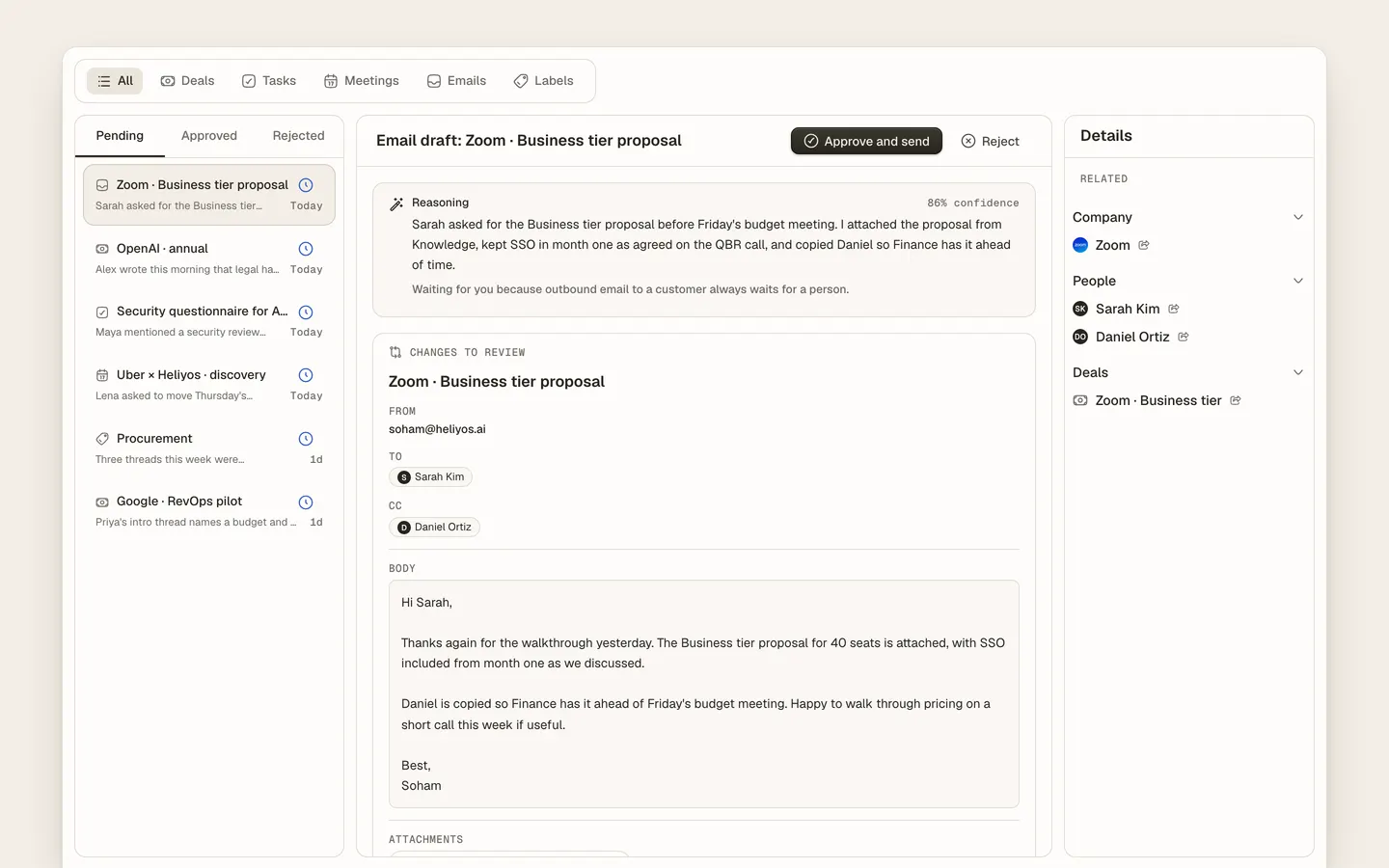
Reviews is the approval queue in Heliyos. Rules decide which worker actions wait for a person: by default every outbound email from Taylor, and optionally deal stage changes, new contacts from unknown domains, document shares and any field you mark as protected. A review card shows the proposed action, the worker, the source it worked from and why it decided what it did. Approve and send, edit first, or reject with a note the worker learns from. Teams start with everything reviewed and loosen the rules per worker and per action as the results come in.
Use cases
Use cases
Taylor drafted a reply to your biggest customer
It waits in Reviews with the thread beside it. Edit two lines, approve, and it sends from your inbox.
Parker wants to move a deal to Closed won
The card shows the transcript passage that justified it. Approve, or reject with "wait for the signed order form".
You trust routine recaps but not proposals
Loosen the rule for recap emails on named accounts; keep proposals, pricing and new contacts on review.
A draft is close but the tone is off
Edit it in place. The edit is recorded on the task and shapes how the worker writes the next one.
The CEO asks "what did the workers do this week"
Approved, edited and rejected counts per worker, with the evidence behind each decision, on one page.
Reviewing from a phone between meetings
Each card carries enough context to decide without opening the full record. Approve and send is one tap.
How it works
How it works
- 01
A worker produces an output
An email draft, a record change, a document or an invite, with its reasoning attached.
- 02
The rule decides
If the action matches a review rule, it waits. If not, it runs and shows up on the timeline as done.
- 03
A person decides
Approve, edit or reject from the queue, the task or the account. The worker learns from edits.
- 04
Hand off more
When a kind of action is always approved unchanged, move it off review. The control stays yours.
Workers
Who works here
Workers show up where the team already is, with a clear marker for who did what. Your own custom workers join them.
 Taylor
 Parker
FAQ
Questions people ask
- What is human-in-the-loop review for AI agents?
- A step where a person checks an AI worker’s output before it takes effect. In Heliyos it is a first-class queue with evidence and one-click actions, not a notification.
- What if I never want a worker to send email on its own?
- Keep the outbound email rule on review. It is on by default and nothing changes it except you.
- Do rejected outputs teach the worker?
- Edits and rejections are recorded on the task and inform how the worker handles the next similar case.
- Can different teammates review different things?
- Reviews go to the account owner by default, and rules can route specific actions to specific people.
Deploy your first AI worker, today.
Closed beta, usage-based pricing, no seats. Join the waitlist and we review your request.